Suite of Building Safety Apps for London Borough of Camden
- Role
- Interaction design
- Type
- Safety-critical web applications
- Result
- Successfully launched multiple public-sector applications
Overview
Camden Council needed to improve how building safety information was managed across its residential buildings, however information was scattered across disconnected apps and spreadsheets. My role focused on designing a suite of applications to support building safety, resident care and emergency response.

The Problem
A fragmented collection of applications and data
Following the Grenfell Tower fire, new legislation introduced the Golden Thread requirements, placing greater emphasis on maintaining accurate, accessible information about higher-risk residential buildings and their safety.
Camden’s existing processes relied on a fragmented collection of applications, spreadsheets and manual workflows. Information was often duplicated across systems, and the applications couldn’t reliably share data. This made it difficult for staff to bring together the information they needed to manage building safety, understand residents’ support needs and respond to emergencies.
The challenge was to design a suite of applications around this complex information landscape, making it easier for staff to find, manage and act on the right information, without adding further complexity to their day-to-day work.
These included:
- Building Safety Manager: Managing building information, safety documentation and evidence for Building Safety Case Reports.
- Home Visits: Giving staff access to property, tenancy and resident information to support home visits and fire risk assessments.
- Support Needs: Helping staff record and access information about residents’ disabilities, communication needs and advocacy arrangements.
- Live Incident Briefing: Providing emergency services with critical building information, including floor plans, safety equipment, key contacts and residents requiring additional assistance.
My Approach
Creating intuitive designs from complex data requirements
I worked closely with business analysts to understand the requirements, underlying data and operational processes behind each application. From there, I took ownership of the UI and interaction design, exploring layouts, mapping user flows and creating interactive Figma prototypes to communicate and refine solutions.
The project was fast-paced and iterative. I worked directly with developers to explore what was possible, resolve interaction details and account for technical edge cases. As the work progressed, I became increasingly familiar with Camden’s existing design system, allowing me to move more quickly from requirements into high-fidelity designs.
Accessibility was a priority throughout, with designs targeting at least WCAG AA. I also adapted existing components and introduced new patterns where the resident-facing design system didn’t adequately support the needs of internal applications.
01
Requirements & context
Understanding user needs and operational requirements
02
User interviews
User interviews with both internal staff and Camden residents
03
Flows & wireframes
Mapping interactions and exploring layouts
04
UI design & prototyping
Designing accessible interfaces and interactive prototypes
05
Iteration & refinement
Refining designs with developers and resolving edge cases
User interviews
Understanding residents and staff
I interviewed six Camden residents and five members of council staff to understand residents’ safety concerns, explore how staff worked with building information, and gather feedback on an early Golden Thread prototype.
Residents: safety through better information
Interviews with residents gave me the opportunity to engage directly with the public and consider their needs when designing services that affected them.
Concerns were raised about fire safety, evacuation procedures and security. None could confidently describe their building’s official evacuation policy, and many wanted clearer access to safety checks, reports and maintenance information.
Five of the six residents responded positively to the early prototype or said it would help them feel safer. Their feedback also highlighted the importance of explaining what happens when safety issues are identified. For example, if something failed an inspection, what action was being taken to fix it and when?

Staff: information that supports day-to-day work
Speaking with internal staff helped me understand their roles, how they worked with existing systems and data, and where friction arose in their day-to-day workflows. These interviews revealed different needs across different teams. Contact centre, fire safety and capital works staff saw potential value in the proposed service, while others highlighted the need to complement existing systems and fit established workflows.
Repair statuses, upcoming actions and maintenance histories emerged as useful areas to explore, particularly for helping customer-facing teams answer residents’ questions.

Interaction design
Prototyping beyond static screens
With complex workflows and information-dense interfaces, static screens weren’t always enough to communicate how a design should behave. I built advanced, interactive Figma prototypes using variables and conditional logic to simulate realistic application behaviour.
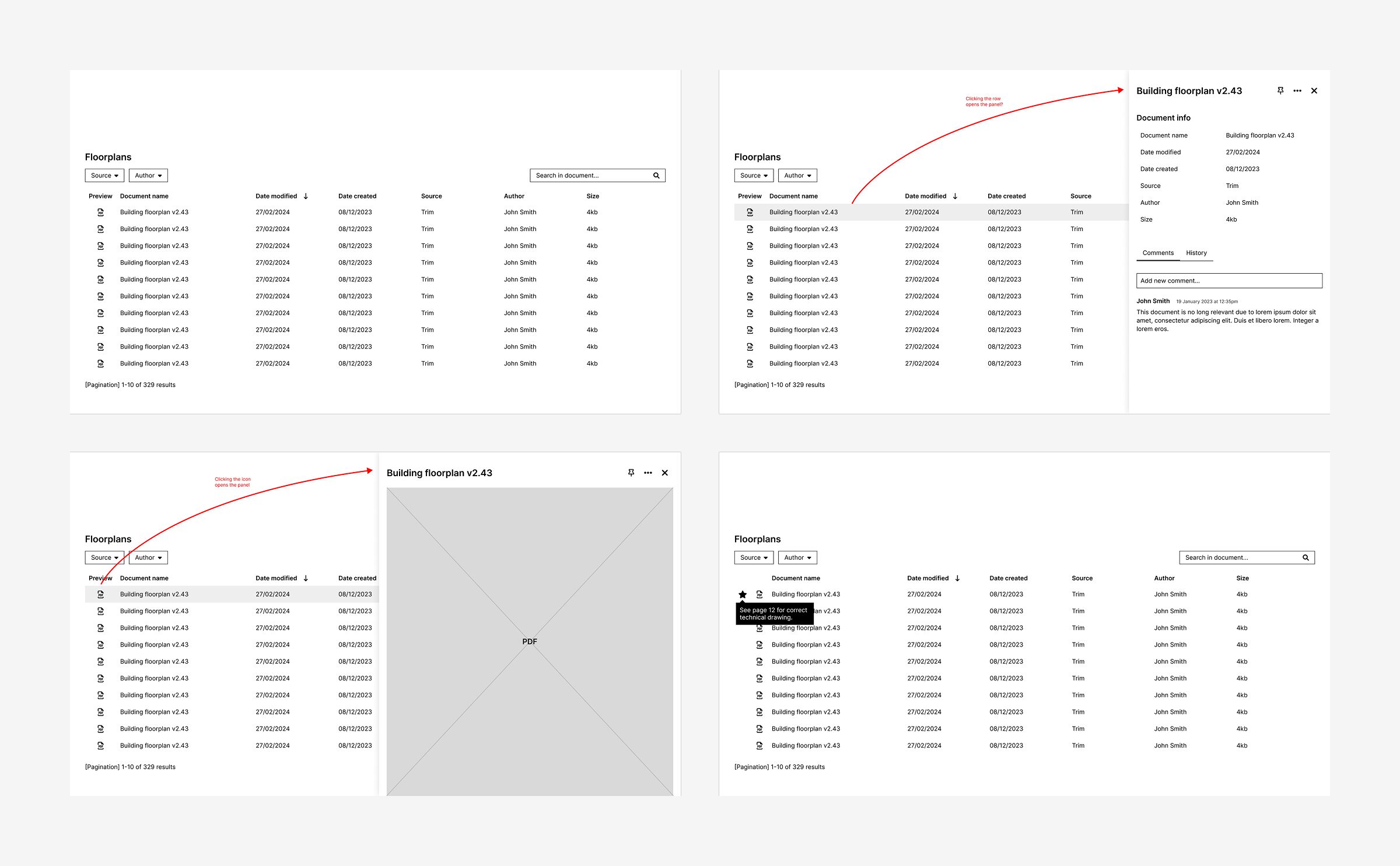
These prototypes included interactive form fields and labels, dynamic panel overlays and state-dependent interactions, allowing stakeholders and developers to explore how different parts of the interface responded to user input. This helped me communicate interaction details, demonstrate complete workflows and work through complex behaviours before implementation.
I also built states, transitions and interactions directly into reusable components. This meant each instance inherited the same interactive behaviour, making it possible to create more realistic, consistent prototypes without having to recreate interactions for every instance.


Project spotlight
Making building safety evidence easier to manage
Building Safety Case Reports require evidence to support claims about the safety of a building. That evidence can be buried within lengthy documents, making it important for building safety managers to identify the relevant information and retain a clear reference to its source.
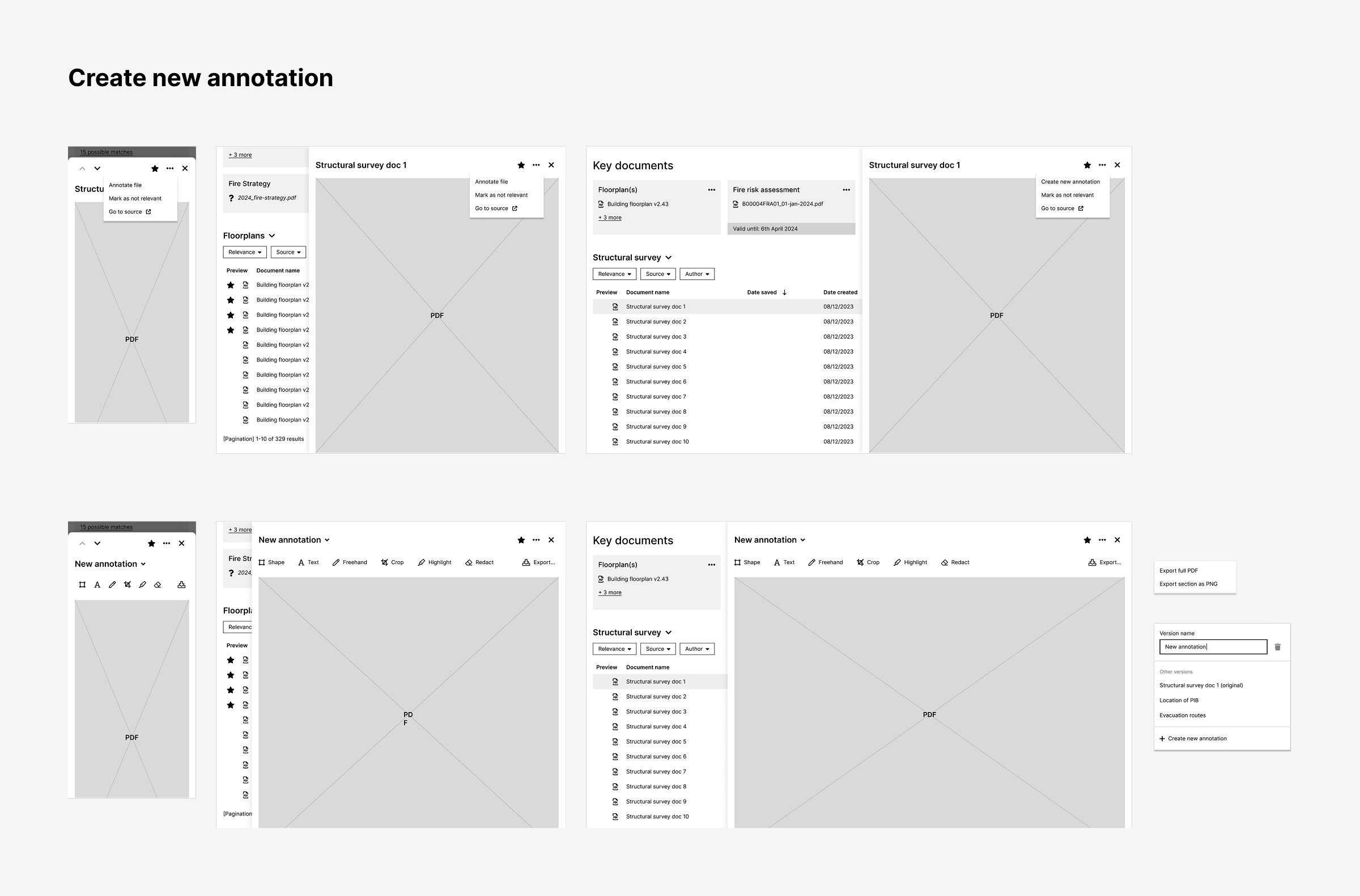
I designed and prototyped an evidence generator within the Building Safety Manager application, allowing users to extract relevant sections of existing documents and organise them into collections for use in safety case reports.
Keeping evidence creation connected to the source
Rather than treating evidence creation as a separate task, I designed it as an action within the existing document workflow. Users could find a document, open its preview and start generating evidence without losing the context of the building they were working on.


Selecting and annotating relevant information
The proposed workflow allowed users to select individual pages or page ranges from a PDF, then annotate the document using tools for highlighting, text and shapes. I designed the viewer to retain the full-page context, helping users identify the relevant information without losing sight of the surrounding document.

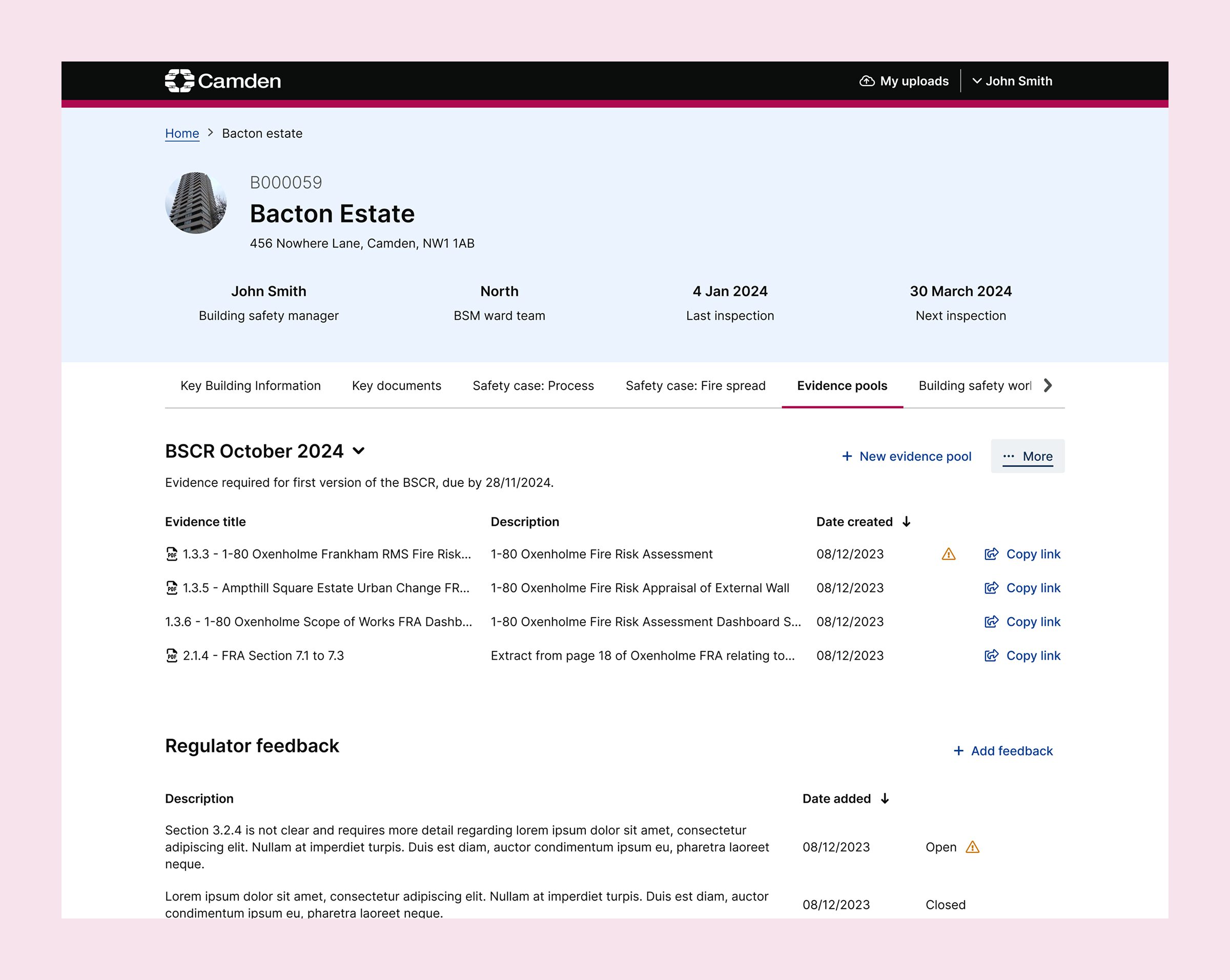
Keeping evidence linked to the source
Once the relevant material had been selected, users could assign it to an existing evidence pool or create a new one, then provide a title and description. The saved evidence could be viewed alongside other items in the pool, managed within the application and shared via a direct link. Each item remained linked to its original document, which could be easily accessed to verify the source and authenticity of the evidence.

Project spotlight
Designing a cross-device identity verification journey
As part of the Support Needs application, I designed elements of a housing advocate registration process that required both the resident and their advocate to provide information, and could be started by either party. My work focused on the identity document upload experience and the subsequent verification workflow for Camden staff.
A key challenge was making document submission straightforward for residents with different levels of digital confidence, while accommodating the fact that they might start the process on a computer but need to use their phone to photograph their ID.
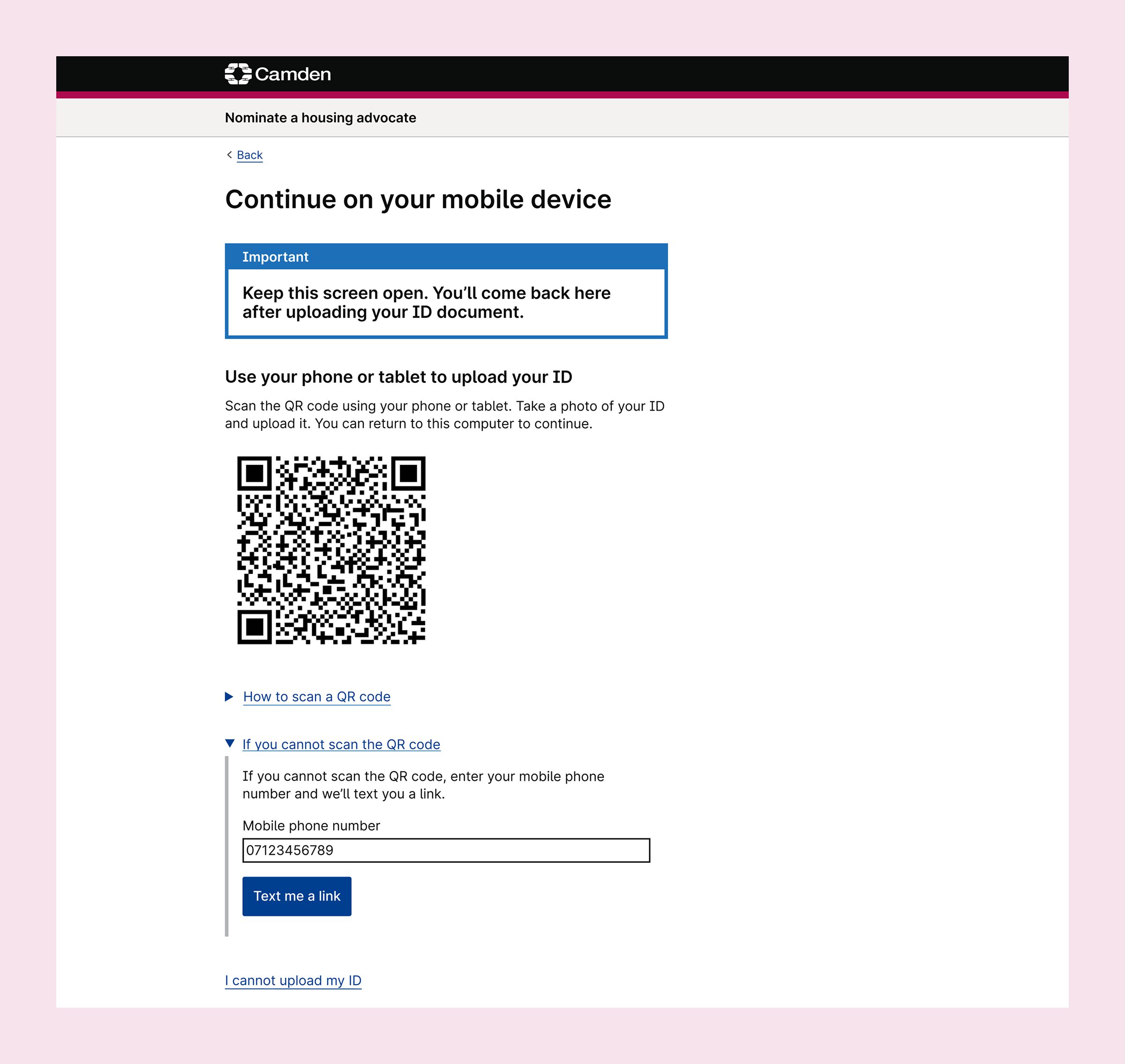
Bridging the gap between desktop and mobile
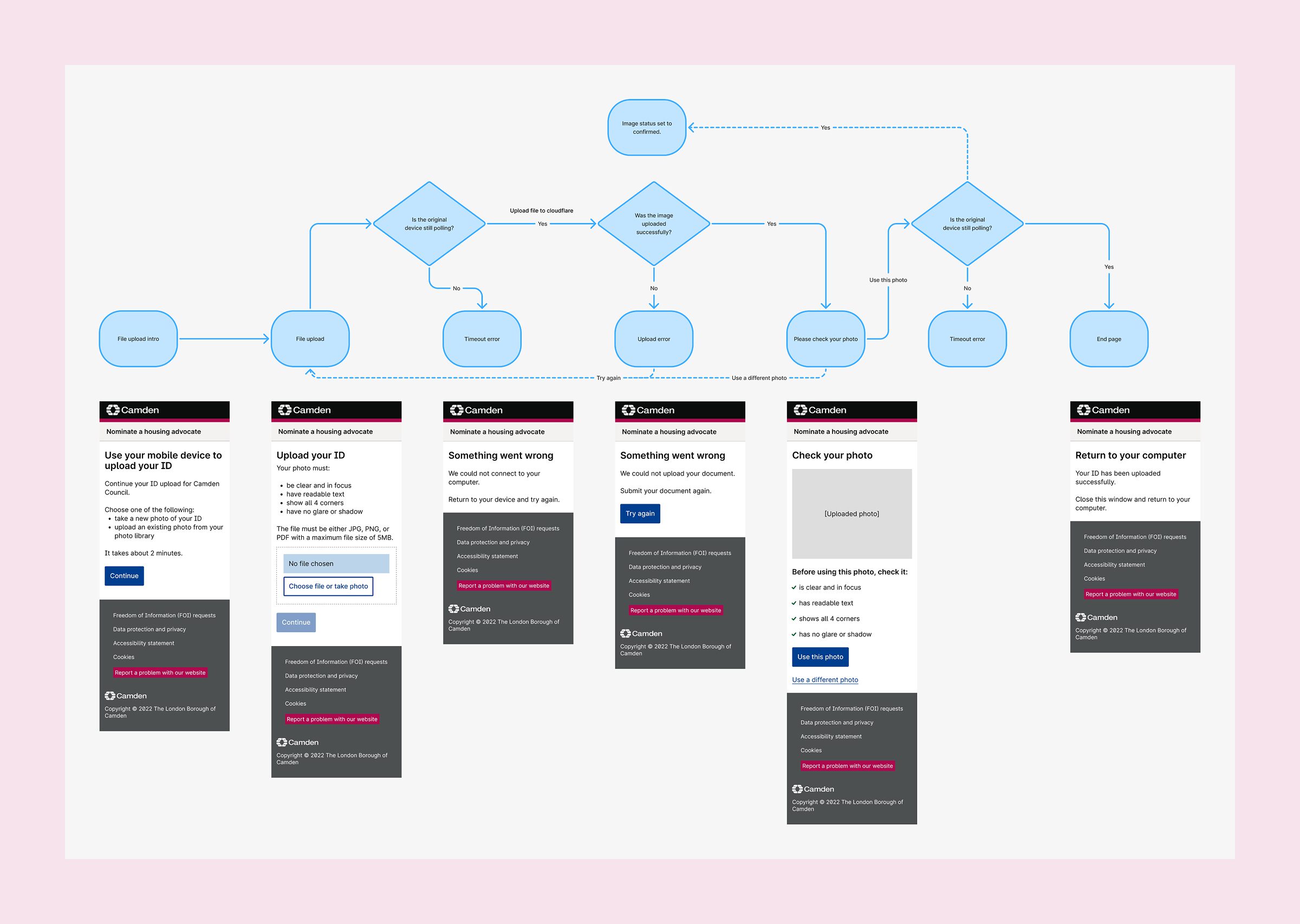
Rather than relying on automatic device detection which isn’t always reliable, I designed an explicit device-selection step to establish how the user wanted to provide their document.
On desktop, users could upload an existing file or switch to their phone. Selecting the latter option generated a QR code that opened the upload experience on their mobile device. Users could photograph or select an existing image, review its quality and submit it before returning to their original computer.
I included guidance on taking a suitable photograph, covering focus, legibility, visibility of all four corners and avoiding glare or shadows. Users could inspect the image and choose another if necessary.

Designing for failure, not just the happy path
The cross-device journey introduced several potential failure points. The desktop needed to know whether an image had arrived, while the mobile upload could fail or the connection between devices could time out.
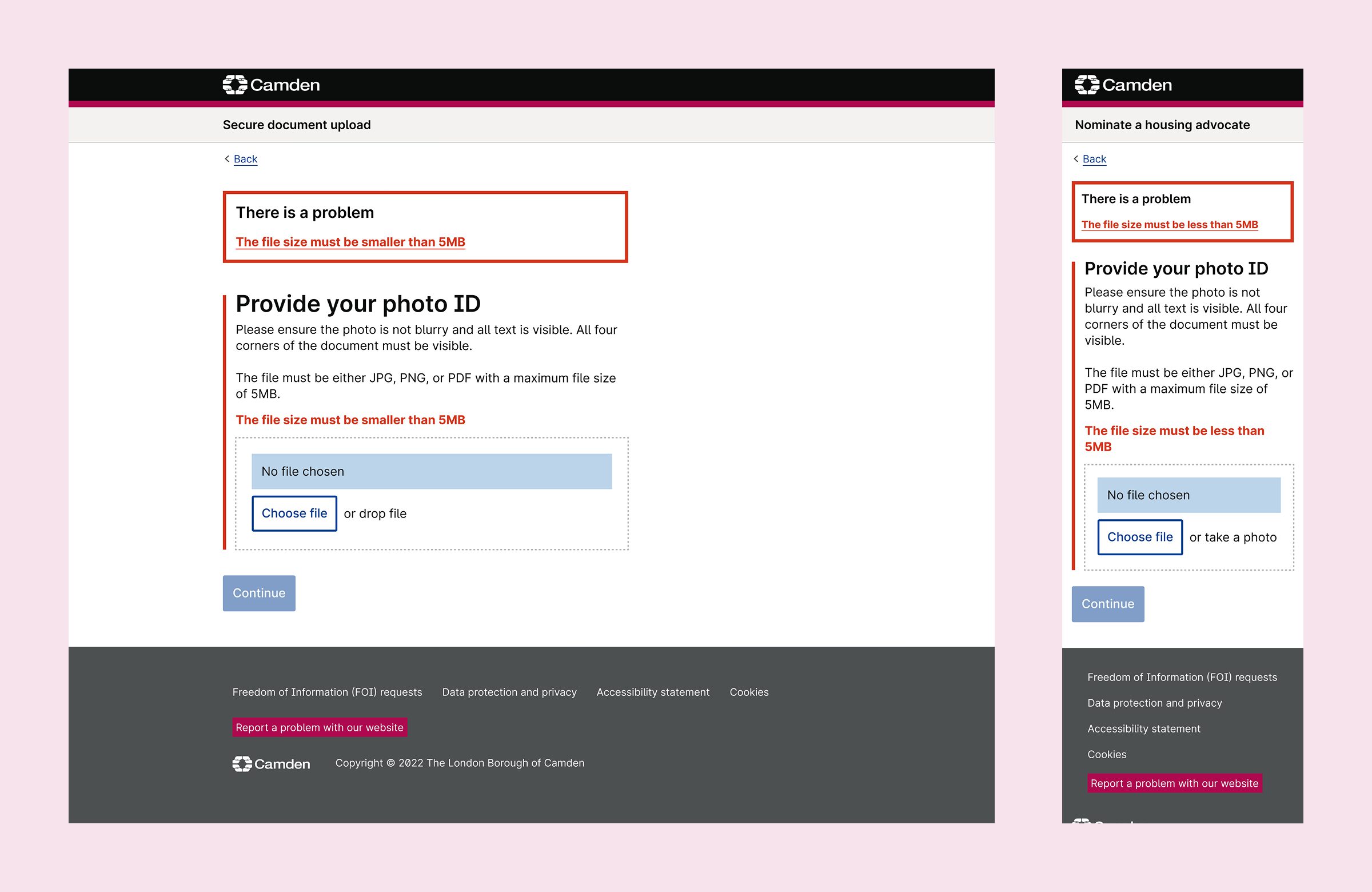
I mapped these scenarios and designed corresponding states, including timeout and upload errors, so users received clear feedback when something went wrong. I worked closely with the developer to understand the possible failure scenarios and ensure the designs accounted for them.
Supporting the staff verification process
The journey continued beyond uploading the document. I designed the staff-facing advocacy applications workflow, where Camden employees could review pending applications and determine what needed to happen next.
The application list used clear status indicators to distinguish incomplete submissions, applications ready for review or in review, and accepted or rejected applications. Additional tags highlighted cases awaiting a resident’s ID or approaching expiry.
For digital verification, staff could view the applicant’s details and uploaded ID alongside a checklist of required checks. Rejecting a document required a reason, which could be returned to the applicant so they could try again. I also designed the alternative in-person review route, including what happened when the resident didn’t have the correct document available.
Together, these designs connected resident-facing submission with the operational process needed to review and progress an application.


Working within the constraints of an existing design system
Camden’s design system provided a useful foundation, helping me work quickly and maintain consistency across the applications. However, it had originally been designed for resident-facing services, rather than information-dense internal tools.
Some of its patterns didn’t translate well. Typography became disproportionately large on desktop, while the button styles gave secondary actions more visual prominence than they needed.
I adapted the system to better suit the context, using the mobile typography scale consistently across the internal applications and introducing more subtle button styles for less prominent actions. Where existing components and patterns weren’t suitable, I created alternatives to support the specific needs of the interface.
Looking back, I would have advocated for a separate, lightweight design system for internal applications. Although adapting the existing system helped me maintain pace, a more appropriate foundation could have provided greater flexibility while giving the suite of applications a more coherent visual language.
The Outcome
Fragmented data to connected services
Over the course of my engagement, I designed interfaces and interaction flows to help connect critical information about Camden’s buildings and residents. The applications supported key processes, making complex information more accessible to staff in their day-to-day roles. The vast majority of the application designs were built and put into use, although I wasn’t involved in the final implementation or post-launch evaluation.